
I'm trying to find Miscellaneous Symbols and Pictograms (1F500 to 1F5FF) in FontLab. I can't seem to locate the relevant page under Codepages or Unicode ranges.
Is there any way to search in FL?
Thanks.
I'm trying to find Miscellaneous Symbols and Pictograms (1F500 to 1F5FF) in FontLab. I can't seem to locate the relevant page under Codepages or Unicode ranges.
Is there any way to search in FL?
Thanks.

FLS is too old to know these Unicode ranges exist, but it you locate the text file "uranges.dat" in one of your FontLab folders, you can add the information about any new Unicode ranges and thus make them accessible in FontLab.
Thanks for the info Jens, I found uranges.dat, but sorry to sound stupid - how do I do that?
"uranges.dat" is a text file and can be edited with any plain text editor, e.g. TextEdit if you're on a Mac (make sure to save the file as plain text, not formatted text after any changes).
You have to add a line for each of your new Unicode ranges with its first and last code point, like this:
0x1D7F6,0x1D7FF,     Math digits monospace

0x1F500,0x1F5FF,1F500 Pictograms

0x1F680,0x1F6C5,1F680 Transport and Map Symbols

0x20000,0x2A6DF,20000 CJK Unified Ideographs Extension B
After a restart of FontLab, the new Unicode range entries will be displayed in the drop-down menu.

Cool.
What about somebody making and publishing a uranges.dat that makes FontLab completely up to date? :->
hhp
Thanks Jens. I tried it and it doesn't work. I noticed on the uranges.dat file when opened in TextEdit shows just the start and end code points, each followed by a comma then the range name, like so:
0x2460,0x24FF,Enclosed Alphanumerics
0x2460,0x2473, Circled numbers
0x2474,0x2487, Parenthesized numbers
0x2488,0x249B, Numbers period
0x249C,0x24B5, Parenthesized Latin letters
0x24B6,0x24E9, Circled Latin letters
0x24EA,0x24EA, Additional circled numbers
Yours, however show start,end,start no comma then range name.
I tried:
0x1F500,0x1F5FF, Pictograms but that didn't work either.
It's also difficult to know exactly where to put the data.
That would be a great idea Hrant - It would be so easy for FontLab to have a page available where one could just copy and paste the data from the internet into the uranges.dat file.
Nick
Nick, I think if you omit the start number after the second comma, that range will be grouped under the previous name. Maybe that’s why you don’t see them in FL?
What about somebody making and publishing a uranges.dat
Are you looking at me, Hrant? ;)
Indeed I seem to have added new ranges to my uranges.dat a while ago, I think I made it manually, so I can’t guarantee it’s completely up to date. I’ve added it to my JK Font Tools repository on SourceForge: http://sourceforge.net/p/jkfonttools/code/6/tree/trunk/FontLab/Data/uran...
Maybe there's something wrong with my settings. This is part of the uranges.dat file. As you see there are many different headings between Miscellaneous Symbols and Dingbats;
0x2600,0x26FF,2600 Miscellaneous Symbols
0x2600,0x260D, Weather and astrological symbols
0x260E,0x2613, Miscellaneous symbols
0x2614,0x2614, Weather symbol
0x2615,0x2615, Miscellaneous symbol
0x2616,0x2617, Japanese chess symbols
0x2619,0x2619, Miscellaneous symbol
0x261A,0x261F, Pointing hand symbols
0x2620,0x2623, Warning signs
0x2624,0x2625, Medical and healing symbols
0x2626,0x262F, Religious and political symbols
0x2630,0x2637, Yijing trigram symbols
0x2638,0x263C, Miscellaneous symbols
0x263D,0x2647, Astrological symbols
0x2648,0x2653, Zodiacal symbols
0x2654,0x265F, Chess symbols
0x2660,0x2667, Playing card symbols
0x2668,0x2668, Miscellaneous symbol
0x2669,0x266F, Musical symbols
0x2670,0x2671, Syriac cross symbols
0x2672,0x267D, Recycling symbols
0x2680,0x2685, Dice
0x2686,0x2689, Go markers
0x268A,0x268F, Yijing monogram and digram symbols
0x2690,0x2691, Map markers
0x26A0,0x26A1, Warning signs
0x26A2,0x26B2, More symbols
0x2700,0x27BF,2700 Dingbats
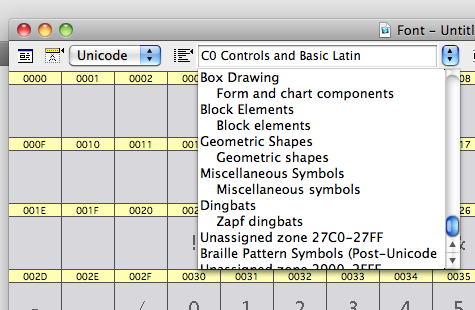
Here's what I see in the unicode ranges pull-down when viewed in FL5.1.2:
Hm. Using my file it looks like this, so it should be possible:
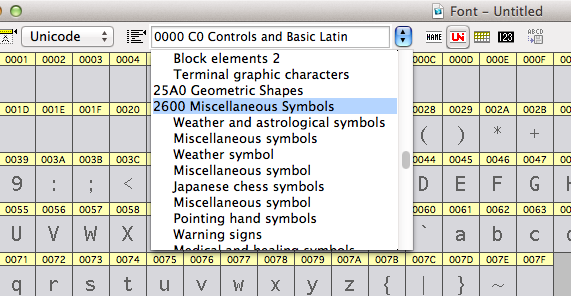
I have no idea why it doesn't work in your FL :-/
I downloaded your would-be-useful file, so thanks for that.
In The Olden Days you used to be able to bin preferences and restart to sort this kind of thing. Now I don't know what to do other than generate the required glyphs manually.
Captured from web.archive.org on 16 Apr 2015. view this capture